Languages
BetterStickies is available in all the languages listed below. You can switch languages at any time without losing your notes.
Supported Languages
| Language | Native Name |
|---|---|
| English | English |
| Arabic | العربية |
| Chinese (Simplified) | 简体中文 |
| French | Français |
| German | Deutsch |
| Hindi | हिन्दी |
| Indonesian | Bahasa Indonesia |
| Japanese | 日本語 |
| Korean | 한국어 |
| Polish | Polski |
| Portuguese | Português |
| Russian | Русский |
| Spanish | Español |
Changing the Language
- Open Menu > Settings… from the hub
- On the General tab, find Interface Language in the Appearance section
- Pick your language and click Apply
- Restart BetterStickies for the change to take full effect
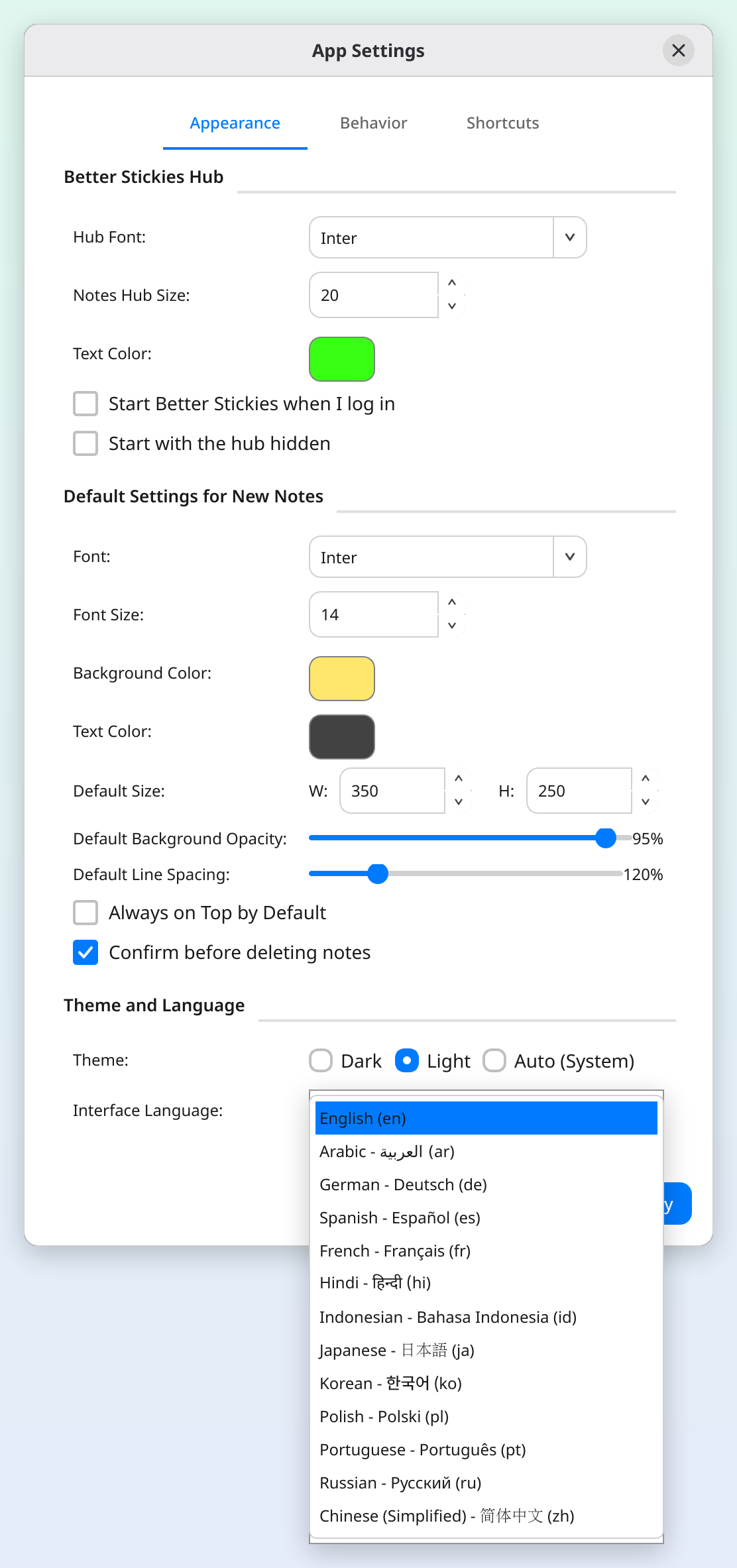
All menus, buttons, dialogs, and tooltips switch to the selected language. Your note content stays exactly as you wrote it.
Right-to-Left Languages
Arabic is a right-to-left (RTL) language: selecting it switches the app's layout to right-to-left. The text you type in a note (Hebrew, Persian, Urdu too) has its own setting, separate from the interface language.
Each note's Text Direction, in the note's Settings (gear icon in the header), is one of:
- Automatic: each line follows its own language, so Arabic lines sit on the right and English lines on the left in the same note. Handy if you write in more than one language
- Right to left: every line is right-to-left
- Left to right: every line is left-to-right
Press Ctrl+Shift+R to switch a note between Right to left and Left to right. If the first thing you type in a new note is Arabic or Hebrew, the note switches to Right to left by itself. To start every new note right-to-left (or left-to-right), set Text Direction in Menu > Settings…, in the Text section of the Notes tab. See Text Formatting for more.
Automatic Detection
If you don't set a language manually, BetterStickies tries to match your system language. If your system language is one of the supported languages, it picks that automatically on first launch.
CJK and Input Methods
Chinese, Japanese, and Korean input methods are supported. BetterStickies works with your system's input method: just type as you normally would.
- ibus (the default on Ubuntu, Fedora, and most GNOME systems) works out of the box in every package format.
- fcitx5 (common on KDE) may not work out of the box in packaged builds: the AppImage can only use it when your system's Qt version matches the bundled one, and it is not supported in the Snap at all.
- If CJK typing doesn't work in a note, try launching BetterStickies with the environment variable
QT_IM_MODULES=ibus(with the S, which takes priority overQT_IM_MODULE): fcitx5 understands the ibus protocol, so this can restore typing even on fcitx5 systems. In the Arch package on a system without IBus installed, also setIBUS_USE_PORTAL=1. - On native Wayland, your desktop's input method has to be chosen first; on KDE Plasma that is under Virtual Keyboard in System Settings. See Troubleshooting.
See Also
- Text Formatting: text direction, alignment and other formatting options
- Keyboard Shortcuts: Ctrl+Shift+R to switch a note between right-to-left and left-to-right
- Getting Started: overview of notes and the hub